
Download Complete Internet Repair – internet repair, fix internet, restore internet, network troubleshooting, internet fix tool
Overview
Complete Internet Repair is a mobile application designed to help users restore lost internet connectivity with minimal effort. In a world where uninterrupted access to online services is essential for work, communication, and entertainment, even temporary disconnections can disrupt daily routines. This tool addresses the frustration of sudden network failures by offering a streamlined process to diagnose and resolve common connection issues. It is particularly useful for individuals who rely heavily on stable internet access but lack advanced technical knowledge.
Target users include home users, remote workers, students, and anyone experiencing recurring network problems. The app functions as a digital first-aid kit, enabling users to reestablish their connection quickly without requiring professional assistance. It supports both Wi-Fi and mobile data troubleshooting, making it versatile across different usage environments. The developer, Jason K. Menard, has positioned this tool as a proactive solution, encouraging users to install it before a problem occurs.
Within the broader app ecosystem, Complete Internet Repair fills a niche by focusing exclusively on network recovery. Unlike general utility apps, it delivers targeted functionality with a clear purpose. Its presence underscores the growing demand for accessible, no-frills tools that solve specific digital challenges. Although the developer did not provide additional technical details, the app’s free pricing model and compact size suggest a lightweight, efficient design aimed at widespread adoption.
Key Features & Functionality
- User-Friendly Interface: The app features an intuitive layout designed for users of all technical levels. Simple navigation and clear prompts allow even beginners to initiate repairs without confusion.
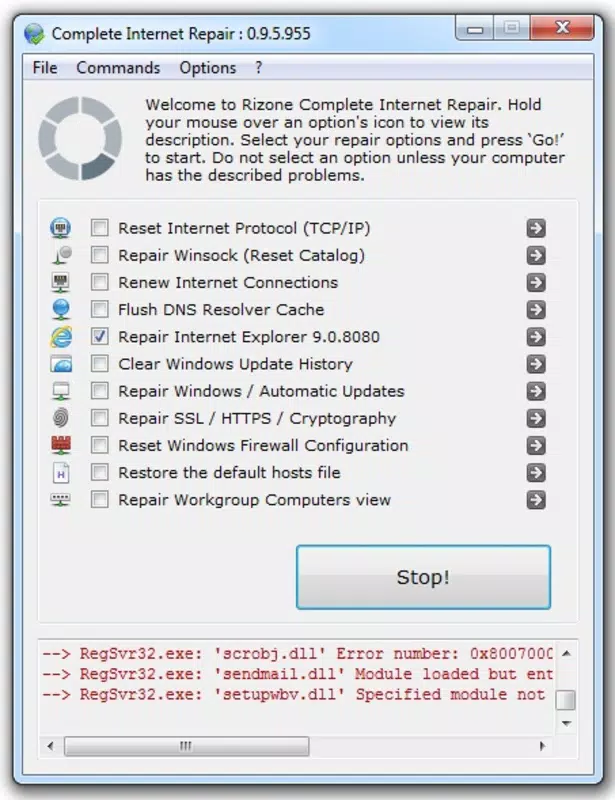
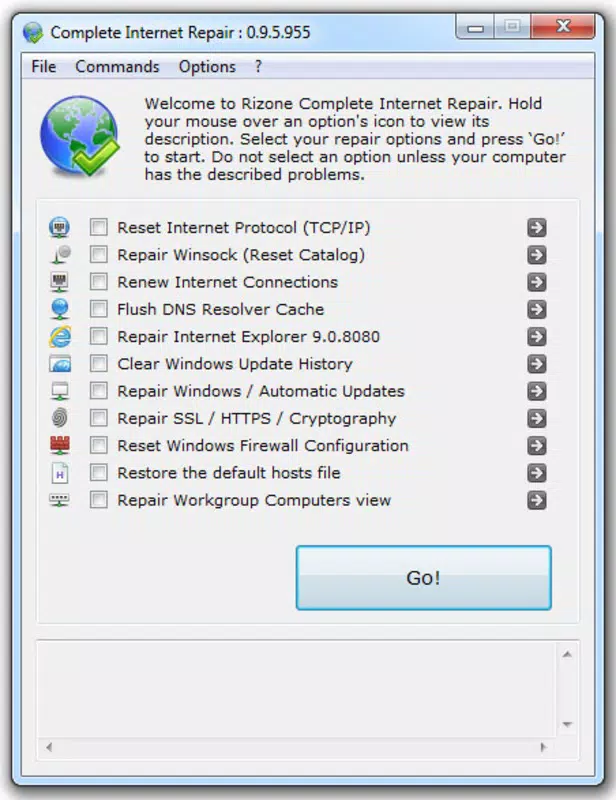
- Selective Repair Options: Users can choose specific network components to troubleshoot, such as DNS cache, IP configuration, or network adapter settings. This precision prevents unnecessary changes and speeds up the recovery process.
- Automatic Repair Process: Once selected, the app automatically executes the necessary commands to restore connectivity, minimizing manual input and reducing the risk of user error.
- Proactive Preparedness: The app encourages users to install it in advance, ensuring immediate access during outages. This preemptive approach helps reduce downtime and anxiety when connectivity fails unexpectedly.
- Lightweight Design: With a file size of just 12.5 MB, Complete Internet Repair consumes minimal storage space, making it suitable for devices with limited capacity.
For example, a student preparing for an online exam can use the app to fix a lagging Wi-Fi connection moments before starting the test. Similarly, a remote worker experiencing a dropped connection during a video call can restore service within seconds. These real-world scenarios highlight the app’s practical value in high-pressure situations.
Interface, UX & Performance
The user interface of Complete Internet Repair is clean and straightforward, emphasizing functionality over visual flair. Navigation is linear and consistent, with a minimal number of on-screen elements to avoid clutter. Users can quickly access repair options through a central dashboard, reducing the time needed to initiate a fix.
Although the developer did not list formal performance metrics, the app’s lightweight design suggests it operates efficiently on a range of Android devices. It is expected to respond promptly to user inputs and complete repair tasks without significant delays. Stability appears to be a priority, as the app focuses on executing system-level commands without introducing errors.
Responsiveness across different device categories—such as smartphones and tablets—is likely to be consistent, given its minimal resource usage. However, specific compatibility details were not disclosed. The app’s performance is not reported to cause battery drain or memory issues, which is a positive indicator for long-term use. Overall, the UX design prioritizes speed and clarity, aligning with its role as a crisis-response tool.
Platform Compatibility & Technical Requirements
Complete Internet Repair is available exclusively on the Android platform. It is compatible with devices running Android OS, though the developer did not specify minimum OS requirements. The app has a file size of 12.5 MB, which is relatively small, indicating it is optimized for efficient installation and operation.
Users can download and install the app directly from official Android channels. The version currently available is 2.1, released on May 15, 2024. The app is offered at no cost, making it accessible to a broad audience. Specific hardware requirements were not listed, so compatibility with older or lower-end devices remains unconfirmed.
Given its size and purpose, the app is likely to function on a wide range of Android smartphones and tablets. However, users should verify their device’s compatibility before installation. The developer did not provide information about updates or future development plans.
Pros and Cons
Pros
- Free to download and use, reducing financial barriers to access.
- Compact file size of 12.5 MB ensures minimal storage impact.
- Simple, intuitive interface suitable for non-technical users.
- Supports selective troubleshooting for precise network fixes.
- Designed for proactive use—can be installed before issues occur.
Cons
- Platform availability is limited to Android only.
- Specific OS version requirements were not disclosed.
- Developer did not provide information on update frequency or long-term support.
- No details on permissions or background processes were shared.
- Compatibility with certain device models or older Android versions remains unclear.
FAQ
Is Complete Internet Repair safe to use?
The app is designed to perform standard network troubleshooting tasks and does not require sensitive permissions. It operates within the system’s standard capabilities, minimizing security risks. However, users should only install it from trusted sources.
Can I use this app on iOS devices?
Currently, Complete Internet Repair is only available for Android. There is no official version for iOS at this time.
Does the app require internet access to function?
No, the app can operate without an active internet connection. It is designed to fix connectivity issues, so it does not rely on the network it is trying to restore.
How often should I update the app?
Updates are recommended when available to ensure compatibility with new Android versions and to receive potential bug fixes. However, the developer did not specify update frequency.
Will the app affect my device’s battery life?
Given its small size and focused functionality, the app is unlikely to cause significant battery drain. It runs only during repair sessions and does not operate in the background.
Final Thoughts
Complete Internet Repair delivers a focused, no-nonsense solution for users facing sudden network disruptions. Its emphasis on simplicity, precision, and preparedness makes it a valuable addition to any Android user’s toolkit. While it lacks broad platform support and detailed technical documentation, its core functionality is clear and effective. The app is especially beneficial for individuals who depend on consistent internet access and want a reliable, instant fix without the complexity of manual troubleshooting.
For those seeking a lightweight, free tool to restore connectivity quickly, Complete Internet Repair offers a compelling value proposition. It turns a common digital stress point into a manageable issue with just a few taps.
Download Complete Internet Repair now


